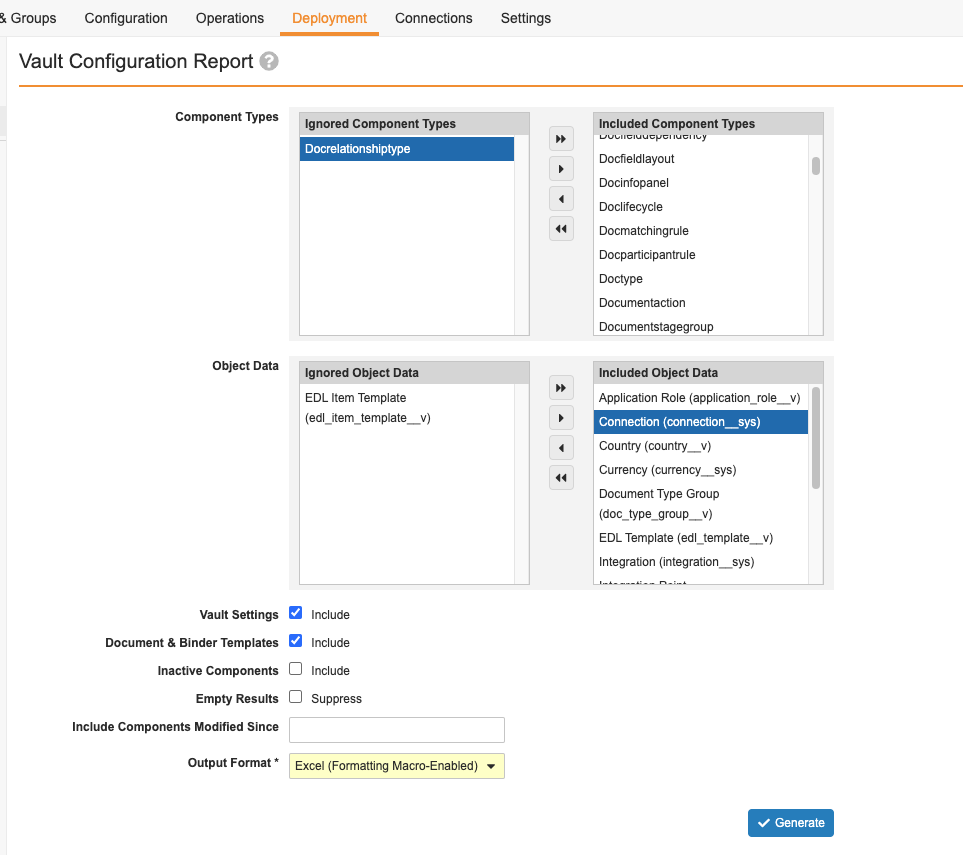
 ## How to Generate the Report
To generate a Vault Configuration Report:
1. Navigate to **Admin > Deployment > Vault Configuration Report**.
2. In the **Component Types** section, select components to include
3. In the **Object Data** section, select object data types to include.
4. Optional: Clear the **Include** checkbox for **Vault Settings** if you do not wish to include Vault settings in the report.
5. Optional: Clear the **Include** checkbox for **Documents & Binder Templates** if you do not wish to include document and binder templates in the report.
6. Optional: Select the **Include** checkbox for **Inactive Components** if you wish to include inactive components and subcomponents in the report.
7. Optional: Select the **Suppress** checkbox for **Empty Results** to exclude tabs with only header rows from the report.
8. Optional: In the **Include Components Modified Since** field, enter a date to only include components and subcomponents modified on or after the specified date. This option does not apply to non-component types.
9. Select the **Output Format**. Vault currently supports the _Excel (Formatting Macro-Enabled_ (XLSM) and _Excel_ (XLSX) output formats.
10. Click **Generate**. This process may take a while. When complete, you'll receive a notification with a link to download the report ZIP file(s). If Vault encounters any component or configuration issues, the notification also includes a link to download an error log as a CSV file. If there are pending component updates, Vault places the report request in a queue and sends you a notification. Once component update processing is complete, Vault generates the report and sends another notification.
## Table of Contents
Vault Configuration Reports include a table of contents with links corresponding to specific components and items of the report, a total count of each component, and the last modified date of the component type.
## Atomic Security
Vault Configuration Reports display configured Atomic Security settings on a lifecycle state as well as any default behavior.
The default state behavior for objects is as follows:
* **Fields**: Edit
* **Controls**: Read
* **Actions**: Execute
* **Active Workflow Actions**: Execute
* **Relationships**: Edit
The default state behavior for documents is as follows:
* **User Actions**: Execute
* **Active Workflow Actions**: Execute
## Permission Sets
Vault Configuration Reports don't show dependent permissions and only display the controlling permissions on an object.
For example:
* If the report shows the _Edit_ permission, it implies the _Read_ permission.
* If the report shows the _Create_ permission, it implies the _Read_ and _Edit_ permissions.
* If the report shows the _Delete_ permission, it implies the _Read_ and _Edit_ permissions.
* If the report shows the _Workflow: eSignature_ permission, it implies the _Workflow: Participate_ permission.
## System-Managed Objects
Vault Configuration Reports exclude the configuration for the following system-managed objects:
* _Document Lifecycle Stage Label_ (`doc_lifecycle_stage_label__sys`)
* _Document Lifecycle State-Stage_ (`doc_lifecycle_state_stage__sys`)
* _Object Lifecycle Stage Label_ (`object_lifecycle_stage_label__sys`)
* _Object Lifecycle State-Stage_ (`object_lifecycle_state_stage__sys`)
* _Envelope_ (`envelope__sys`)
* _Envelope Content_ (`envelope_content__sys`)
* _Email_ (`email__sys`)
* _Emailed Document_ (`emailed_document__sys`)
* Objects of the _eSignature_ object class
## Additional Notes
* Document workflows that have never been made active are not shown on Vault Configuration Reports, even if the **Include Inactive Components** checkbox is selected. Once a document workflow has been made active, it always shows on a Vault Configuration Report, regardless of its current editing status.
* When you select **Object Data** to include in the report, Vault creates a separate Excel Workbook for this section.
* You can view the status of the report job on the **Job Status** page.
* The table of contents does not include a count or last modified date for Vault Settings or sub-components.
* When you select **Include Inactive Components** and include an inactive _Document Lifecycle Role_ in the report, the report cannot retrieve Default and Override rules even if they are defined for that inactive role.
* _Component Modified Date_ values refer to component-level modifications and do not reflect modifications to subcomponents. For example, modifying an object field does not change the _Component Modified Date_ value for an object, but modifying the object label does.
* Yes/No checkmark fields in Configuration Reports display a checkmark for _Yes_ values, an X for _No_ values, and are blank if the field is null and neither _Yes_ nor _No_ are returned. This behavior does not apply to the _Active_ column.
* If a component is not accessible, an _Error_ column displays on the component's tab in the Vault Configuration report with the message "Failed to retrieve component. Please refer to error log for details" on the component's specific row. The Vault Comparison report displays a message stating the inaccessible component type is skipped in the Vault Comparison report.
* **Business Admin** and custom tabs display columns that reference grandparent objects for grandchild objects at runtime. These columns are not displayed in the Vault Configuration report as they are displayed only for reference purposes to distinguish unique records based on the parent and grandparent object fields.
## Component Types
See Component Types for the list of configuration elements that the Vault Configuration Report supports.
### Non-Component Types {#non_component_types}
Although Configuration Reports include _Vault Settings_, _Document Binder & Templates_, and Document Lifecycle _Default Rules_ & _Override Rules_, these are non-component types and cannot be included in migration packages.
## Related Permissions
Users with the standard _Vault Owner_ and _System Admin_ security profiles have the necessary permissions to use Vault Configuration report. If your organization uses custom security profiles, be sure to include these permissions:
## How to Generate the Report
To generate a Vault Configuration Report:
1. Navigate to **Admin > Deployment > Vault Configuration Report**.
2. In the **Component Types** section, select components to include
3. In the **Object Data** section, select object data types to include.
4. Optional: Clear the **Include** checkbox for **Vault Settings** if you do not wish to include Vault settings in the report.
5. Optional: Clear the **Include** checkbox for **Documents & Binder Templates** if you do not wish to include document and binder templates in the report.
6. Optional: Select the **Include** checkbox for **Inactive Components** if you wish to include inactive components and subcomponents in the report.
7. Optional: Select the **Suppress** checkbox for **Empty Results** to exclude tabs with only header rows from the report.
8. Optional: In the **Include Components Modified Since** field, enter a date to only include components and subcomponents modified on or after the specified date. This option does not apply to non-component types.
9. Select the **Output Format**. Vault currently supports the _Excel (Formatting Macro-Enabled_ (XLSM) and _Excel_ (XLSX) output formats.
10. Click **Generate**. This process may take a while. When complete, you'll receive a notification with a link to download the report ZIP file(s). If Vault encounters any component or configuration issues, the notification also includes a link to download an error log as a CSV file. If there are pending component updates, Vault places the report request in a queue and sends you a notification. Once component update processing is complete, Vault generates the report and sends another notification.
## Table of Contents
Vault Configuration Reports include a table of contents with links corresponding to specific components and items of the report, a total count of each component, and the last modified date of the component type.
## Atomic Security
Vault Configuration Reports display configured Atomic Security settings on a lifecycle state as well as any default behavior.
The default state behavior for objects is as follows:
* **Fields**: Edit
* **Controls**: Read
* **Actions**: Execute
* **Active Workflow Actions**: Execute
* **Relationships**: Edit
The default state behavior for documents is as follows:
* **User Actions**: Execute
* **Active Workflow Actions**: Execute
## Permission Sets
Vault Configuration Reports don't show dependent permissions and only display the controlling permissions on an object.
For example:
* If the report shows the _Edit_ permission, it implies the _Read_ permission.
* If the report shows the _Create_ permission, it implies the _Read_ and _Edit_ permissions.
* If the report shows the _Delete_ permission, it implies the _Read_ and _Edit_ permissions.
* If the report shows the _Workflow: eSignature_ permission, it implies the _Workflow: Participate_ permission.
## System-Managed Objects
Vault Configuration Reports exclude the configuration for the following system-managed objects:
* _Document Lifecycle Stage Label_ (`doc_lifecycle_stage_label__sys`)
* _Document Lifecycle State-Stage_ (`doc_lifecycle_state_stage__sys`)
* _Object Lifecycle Stage Label_ (`object_lifecycle_stage_label__sys`)
* _Object Lifecycle State-Stage_ (`object_lifecycle_state_stage__sys`)
* _Envelope_ (`envelope__sys`)
* _Envelope Content_ (`envelope_content__sys`)
* _Email_ (`email__sys`)
* _Emailed Document_ (`emailed_document__sys`)
* Objects of the _eSignature_ object class
## Additional Notes
* Document workflows that have never been made active are not shown on Vault Configuration Reports, even if the **Include Inactive Components** checkbox is selected. Once a document workflow has been made active, it always shows on a Vault Configuration Report, regardless of its current editing status.
* When you select **Object Data** to include in the report, Vault creates a separate Excel Workbook for this section.
* You can view the status of the report job on the **Job Status** page.
* The table of contents does not include a count or last modified date for Vault Settings or sub-components.
* When you select **Include Inactive Components** and include an inactive _Document Lifecycle Role_ in the report, the report cannot retrieve Default and Override rules even if they are defined for that inactive role.
* _Component Modified Date_ values refer to component-level modifications and do not reflect modifications to subcomponents. For example, modifying an object field does not change the _Component Modified Date_ value for an object, but modifying the object label does.
* Yes/No checkmark fields in Configuration Reports display a checkmark for _Yes_ values, an X for _No_ values, and are blank if the field is null and neither _Yes_ nor _No_ are returned. This behavior does not apply to the _Active_ column.
* If a component is not accessible, an _Error_ column displays on the component's tab in the Vault Configuration report with the message "Failed to retrieve component. Please refer to error log for details" on the component's specific row. The Vault Comparison report displays a message stating the inaccessible component type is skipped in the Vault Comparison report.
* **Business Admin** and custom tabs display columns that reference grandparent objects for grandchild objects at runtime. These columns are not displayed in the Vault Configuration report as they are displayed only for reference purposes to distinguish unique records based on the parent and grandparent object fields.
## Component Types
See Component Types for the list of configuration elements that the Vault Configuration Report supports.
### Non-Component Types {#non_component_types}
Although Configuration Reports include _Vault Settings_, _Document Binder & Templates_, and Document Lifecycle _Default Rules_ & _Override Rules_, these are non-component types and cannot be included in migration packages.
## Related Permissions
Users with the standard _Vault Owner_ and _System Admin_ security profiles have the necessary permissions to use Vault Configuration report. If your organization uses custom security profiles, be sure to include these permissions:
| Type | Permission Label | Controls |
| Security Profile | Admin: Deployment: Environment: Vault Configuration Report | Ability to access the Vault Configuration Report feature. |
| Security Profile | Objects: Vault Component: Read | Ability to populate component records in the Vault Configuration Report. |
| Security Profile | Application: API: Metadata API | Ability to populate object data in the Vault Configuration Report. |
| Security Profile | Admin: Configuration: Mobile Setup: Manage Mobile Tabs | Ability to populate mobile tab configurations in the Vault Configuration Report. |