# QualityOne Training Management Overview

 
<div class="note-border alert-info">
  <div class="alert alert-info" role="alert">
    <div><i class="far fa-info-circle"></i></div>
    <div class="alert-text">
      <p><strong>Note</strong>: This article refers to Training Management configured within a QualityOne Vault. If your organization uses a Training Vault, see <a href="/en/gr/549898/">Overview of Training Environments in QualityOne</a> for details on the different training environments and the applicable information to your Vault.</p>
    </div>
  </div>
</div>


QualityOne Training Management is an application that uses role-based qualification and training to support job and audit readiness while demonstrating compliance. It gives companies the tools necessary to deliver the right content to the right Learners and maintain employee competencies. Content development, changes and delivery, and role readiness become a seamless, continuous lifecycle.

Training Management allows the configuration and maintenance of a training matrix, which includes _Learner Roles_, _Curricula_, and _Training Requirements_. Changes to the training matrix automatically push _Training Assignment_ records and workflow tasks to users for completion. Additionally, document revisions in QualityOne can trigger assignment of training-related workflow tasks to users.

Contact your Veeva Representative to learn more about how to get the Training Management add-on application for your QualityOne Vault. 

QualityOne Training Management is part of the <a href="/en/gr/38220/">Veeva QualityOne</a> family of applications. With a single Vault, your organization can have one (1), two (2), or all of these applications. Each user requires a license depending on whether they administer training (_Full User_) or just complete training activities (_Learner User_).

## Features {#features}

QualityOne Training Management is built on Vault and includes the features described in <a href="/en/gr/0003/">Vault Help for Platform</a>. In addition, it provides the following features:

* **<a href="/en/gr/55176/">Automated Creation and Dissemination of Training Assignments</a>**: QualityOne Training Management utilizes scheduled jobs to create automation within the application. Vault creates _Training Assignment_ object records automatically based on the lifecycle state of the _Learner Roles_, _Curricula_, _Training Requirements_, and _Training Assignment_ objects. When an Admin updates a user's _Learner Role_ or makes changes to _Curriculum_ or _Training Requirement_ object records, Training Management automatically assigns the relevant _Training Assignment_ to the user.
* **<a href="/en/gr/71126/">Learner Homepage</a>**: QualityOne Training Management provides an intuitive, easy to use dashboard that provides the Learner with an overview of their open assignments. Assignment cards display key information such as the related _Curriculum_, estimated completion time, the training document's _Effective Date_, due date, categories, and more.
* **<a href="/en/gr/55166/">Training Dashboard</a>**: QualityOne Training Management provides Training Dashboard page to show the progress of training programs, at-risk qualifications, and training assignments, and allows training managers to take action where needed.
* **<a href="/en/gr/55154/#manager_access">Manager Access</a>**: QualityOne Training Management assigns the _Direct Manager_ application role for a given _Learner_ to the _Learner's Manager_ group on each of the _Learner's_ training records: _Training Assignments_, _Assignment Details_, _TA Checklists_, _TA Responses_, _Class Schedules_, _Class Rosters_, _Sessions_, and _Session Rosters_. This allows the _Learner's_ manager to view assignments of their direct reports. The _Learner's Manager_ group may also receive workflow tasks, such as verifying proof of completion for External Training.
* **<a href="/en/gr/55163/">Direct Assignments</a>**: QualityOne Training Management allows you to issue training assignments to Learners as-needed via a user action, separately from the automated system-managed job process.
* **<a href="/en/gr/55173/">Quizzes</a>**: QualityOne Training Management adds optional components that can be configured for _Training Requirements_ to aid or assess the user's understanding and competency of the training material.
* **<a href="/en/gr/71122/">Document Training</a>**, **<a href="/en/gr/65465/">Instructor-Led Training</a>**, and **<a href="/en/gr/71124/">External Training</a>**: QualityOne Training Management provides the _Training Requirement_ types that allows online training in Vault, in-person classroom training, or training that occurs outside of Vault.
* **<a href="/en/gr/71120/">Substitute Training</a>**: QualityOne Training Management can assign an alternative, or substitute, _Training Assignment_ to a Learner in place of a required, or primary, _Training Assignment_ using _Training Administrator_-defined substitution rules.
* **<a href="/en/gr/71117/">Facilitated Training</a>**: QualityOne Training Management enables users with proper access to give completion credit for _Training Assignments_ on behalf of Learners. This allows completion of Vault document _Training Assignments_ for Learners that may not have access to Vault. For example, in some organizations, users could be contractors, external employees, temporary employees, or otherwise outside the primary organization.

## Example Training Model {#training-model}

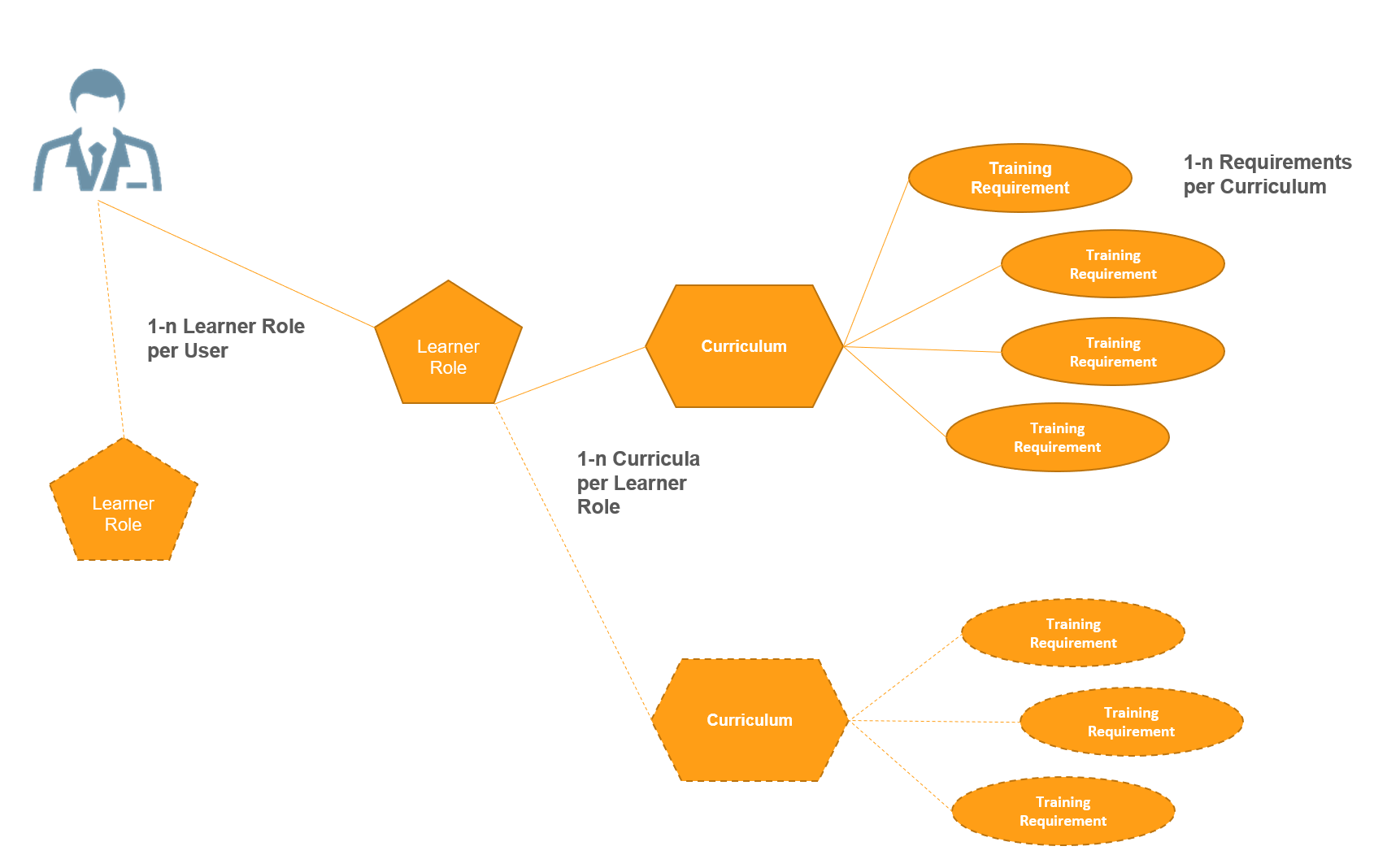
Here is an example of how you may set up a training model:

<a href="https://platform.veevavault.help/assets/images/CPC-TrainingMgmt-DataModel.png" data-lightbox="CPC-TrainingMgmt-DataModel.png" data-title="" data-alt="Example Training Model Diagram">
  <img class="docimage" src="https://platform.veevavault.help/assets/images/CPC-TrainingMgmt-DataModel.png" alt="Example Training Model Diagram" style="max-width: 70%;"  />
</a>

In this example, the _Learner_ is assigned a _Learner Role_ that is associated with two (2) _Curricula_. The _Curricula_ themselves are comprised of several different _Training Requirements_. Training Management checks the lifecycle state of each object record and, if all are in eligible states, issues a _Training Assignment_ to the _Learner_ for each requirement. For this example, Training Management assigns the user seven (7) total training assignments.

## Related Articles {#related-articles}

Learn more about using the QualityOne Training Management application in these articles:

* <a href="/en/gr/55166/">QualityOne Training Dashboard</a>
* <a href="/en/gr/71126/">About the Learner Homepage</a>
* <a href="/en/gr/71117/">Working with Facilitated Training</a>
* <a href="/en/gr/71120/">Substitute Training Requirements</a>
* <a href="/en/gr/55170/">Completing Training Assignments</a>
* <a href="/en/gr/71132/">E-Learning Content Troubleshooting & FAQ</a>

### Admin Articles {#admin-articles}

Learn about configuring the Training Management application in these articles:

* <a href="/en/gr/55154/">Configuring QualityOne Training Management</a>
* <a href="/en/gr/71122/">Configuring Vault Document Training Requirements</a>
* <a href="/en/gr/65465/">Configuring Classroom Training Requirements</a>
* <a href="/en/gr/71124/">Configuring External Training Requirements</a>
* <a href="/en/gr/55176/">QualityOne Training Management Automation</a>
* <a href="/en/gr/55163/">Configuring Direct Assignments</a>
* <a href="/en/gr/55157/">Importing Training Assignments</a>
* <a href="/en/gr/55173/">Configuring QualityOne Training Management Quizzes</a>
* <a href="/en/gr/65458/">QualityOne Training Impact Assessments</a>
* <a href="/en/gr/71118/">Configuring Facilitated Training</a>
* <a href="/en/gr/71128/">Setting Up E-Learning Content Support</a>
* <a href="/en/gr/71130/">Defining Training Completion Criteria for E-Learning Content</a>