**Source URL:** https://qualityone.veevavault.help/en/gr/627672/index.md

# Defining CoA Matching Rules (QMS)

<a href="/en/gr/78610/">QualityOne Vaults</a> enable you to improve the accuracy of CoA file ingestion by defining _COA Matching Rules_ to extract data associated with critical fields. As users work with CoA files for inspection, some files may use slightly different terminology to describe the same fields and values from your organization. While analyzing a file prompts Vault to extract fields and values, Vault may not recognize some terms and language to populate field values in the _Inspection Sample Test Result_ section accurately. To increase the accuracy of field value ingestion, you must define _COA Matching Rule_ records to guide Vault to match specific key _COA Matching Field_ values to the extracted analysis results for _Inspection Sample Test Results_.

You can define a _COA Matching Rule_ record for the header or table section of the file by including the key field value that your organization utilizes and the data type expected from the extracted analysis result. You must also define the required variant texts for each matching rule. You can also define matching rules and variants for header values in a CoA file that may not have an accompanying key field. After configuring _COA Matching Rule_ records, you must create [_COA Matching Rule Variant_ records][4] for each matching rule to ensure that Vault will accurately match various alternate terms to the applicable matching rule.

The accuracy of CoA file ingestion is essential to extract the correct data needed when analyzing different CoA formats provided by your suppliers. If you don't configure CoA matching rules, Vault maps only exact matches for header information and table column values from the CoA file to fields in your Vault.

<div class="note-border alert-info">
  <div class="alert alert-info" role="alert">
    <div><i class="far fa-info-circle"></i></div>
    <div class="alert-text">
      <p><strong>Note</strong>: This feature is currently available only to Early Adopters. Contact your Veeva Representative for more details.</p>
    </div>
  </div>
</div>


## Matching Rule Types {#mr-type}

There are three types of matching rules:

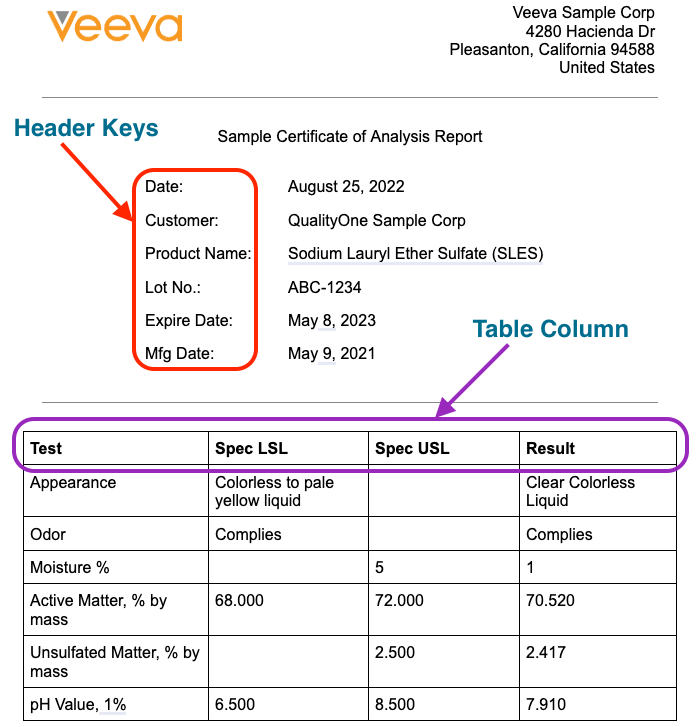
* **Header Key**: Used to match key standard fields found in the document information section of a CoA file to extract the value associated with the key field. For example, you can configure "Customer" as a matching rule variant of the "Supplier Name" matching rule. The header keys are standard fields defined in the _COA Header OCR Data_ object, such as _Supplier Name_. You can additionally define up to three supplemental header key fields to help Vault extract information from a CoA file that may not be available as standard _Header Keys_, such as material. These fields are standard fields on the _COA Header OCR Data_ object defined as _Supplemental Field 1_, _Supplemental Field 2_, and _Supplemental Field 3_. If configured by your Admin, creating matching rules and variants for supplemental header key fields can help Vault identify the _Inspection Plan_ for an _Inspection_ if none is provided.
* **Header Value**: Used to match header values that may not have an associated header key field. Vault searches the entire CoA file, not only the header area, for configured header values. For example, you can configure the expected material description value from a certain supplier as a variant of the header value matching rule for the material description. The header values are associated with standard fields defined in the _COA Header OCR Data_ object as _Supplemental Field 1_, _Supplemental Field 2_, and _Supplemental Field 3_. You can define header values for any _Header Key_ fields. You can create up to ten variants for header values, so they should be generic enough to apply to all CoA files in your Vault. If a header key and header value _COA Matching Rule_ exists for the same supplemental field, we recommend that both matching rules are configured to locate the same content on the document.
* **Table Column**: Used to match key standard fields found in the column header of a CoA file to extract the values associated with the key field. For example, you can configure "Test" as a matching rule variant of the "Characteristic" matching rule. The table column keys are standard fields defined in the _COA Test Results OCR Data_ object, such as _Characteristic_.

<a href="https://platform.veevavault.help/assets/images/cp-qms-sample-coa-file.png" data-lightbox="images" data-title="" data-alt="Sample CoA File">
  <img class="docimage" src="https://platform.veevavault.help/assets/images/cp-qms-sample-coa-file.png" alt="Sample CoA File" style="max-width: 60%;"  />
</a>

### CoA Matching Fields {#matching-field}

For each _Matching Rule Type_, there are key standard fields that Vault uses to match with:

* For _Header Key_:
  * _Item Code_ (`item_code__v`)
  * _Item Name_ (`item_name__v`)
  * _Purchase Order_ (`purchase_order__v`)
  * _Purchase Order Line Item_ (`purchase_order_line_item__v`)
  * _Supplemental Field 1_ (`supplemental_field_1__v`)
  * _Supplemental Field 2_ (`supplemental_field_2__v`)
  * _Supplemental Field 3_ (`supplemental_field_3__v`)
  * _Supplier Date of Manufacture_ (`supplier_date_of_manufacture__v`)
  * _Supplier Expire Date_ (`supplier_expire_date__v`)
  * _Supplier Item Code_ (`supplier_item_code__v`)
  * _Supplier Manufacturing Lot Code_ (`supplier_manufacturing_lot_code__v`)
  * _Supplier Manufacturing Site Address_ (`supplier_mfg_site_address__v`)
  * _Supplier Manufacturing Site Name_ (`supplier_manufacturing_site_name__v`)
  * _Supplier Name_ (`supplier_name__v`)

* For _Header Value_:
    * _Item Code_ (`item_code__v`)
    * _Item Name_ (`item_name__v`)
    * _Purchase Order_ (`purchase_order__v`)
    * _Purchase Order Line Item_ (`purchase_order_line_item__v`)
    * _Supplemental Field 1_ (`supplemental_field_1__v`)
    * _Supplemental Field 2_ (`supplemental_field_2__v`)
    * _Supplemental Field 3_ (`supplemental_field_3__v`)
    * _Supplier Date of Manufacture_ (`supplier_date_of_manufacture__v`)
    * _Supplier Expire Date_ (`supplier_expire_date__v`)
    * _Supplier Item Code_ (`supplier_item_code__v`)
    * _Supplier Manufacturing Lot Code_ (`supplier_manufacturing_lot_code__v`)
    * _Supplier Manufacturing Site Address_ (`supplier_mfg_site_address__v`)
    * _Supplier Manufacturing Site Name_ (`supplier_manufacturing_site_name__v`)
    * _Supplier Name_ (`supplier_name__v`)

* For _Table Column_:
  * _Characteristic_ (`characteristic__v`)
  * _Max_ (`max__v`)
  * _Min_ (`min__v`)
  * _Specification_ (`specification__v`)
  * _Test Method_ (`test_method__v`)
  * _Test Result_ (`test_result__v`)
  * _UoM_ (`unit_of_measure__v`)

## Configuring CoA Matching Rules {#config-matching-rules}

After creating the _COA Matching Rule_ records, ensure you create the appropriate [_COA Matching Rule Variants_][4] as needed for each matching rule.

To configure CoA matching rules:

1. Navigate to **Business Admin > Objects > COA Matching Rules**.
2. Click **Create**.
3. Optional: Enter a description for the matching rule.
4. Select a **Matching Rule Type**.
5. Select a **COA Matching Field**. This is the key standard field Vault uses to match with, such as _Supplier Name_ (`supplier_name__v`).
6. Optional: Select a **Data Type**. This defines the format of value that Vault expects from the _Expected Value Format_ field in the _COA Matching Rule Variant_ records. The _Expected Value Format_ field does not require a format if you leave this field blank.
  * If you choose _Date_, ensure you define a valid date format in the _Expected Value Format_ field. If you do not define the _Expected Value Format_, Vault makes a "best guess" based on commonly used date formats.
  * If you choose _Text_, you may use a Regex format defined in the _Expected Value Format_ field.
  * If the _COA Matching Rule Type_ is _Header Value_, selecting _Date_ is not supported.
7. Click **Save**. To create another matching rule, click **Save + Create**.

## Configuring COA Matching Rule Variants {#config-coa-mr-var}

After configuring the required CoA matching rules, you must create CoA matching rule variants to define various alternate terms for each matching rule to improve the accuracy of field value ingestion. See <a href="/en/gr/76179/">Configuring CoA Matching Rule Variants</a> for more details.

## Limitations

The following limitations apply to CoA matching rules:

* You cannot update the _Matching Rule Type_ on a _COA Matching Rule_ if the matching rule has any active _Matching Rule Variants_.
* _Header Value_ type _COA Matching Rules_ cannot have a _Data Type_ of _Date_.

[1]: #mr-type
[2]: #matching-field
[3]: #config-matching-rules
[4]: #config-coa-mr-var