 ### How to Create a Risk Matrix {#create-matrix}
To create a _Risk Matrix_:
1. Create a _Risk Matrix_ record from a custom tab or from **Business Admin > Objects > Risk Matrices**.
2. In the dialog, select a risk matrix type of qualitative or quantitative.
3. Enter a **Name** for the matrix.
4. Enter a **Risk Matrix Dimension** to specify whether the assessment uses 2D or 3D risk matrices.
* If you use both 2D and 3D risk matrices in your Vault, _Risk Matrix Dimension_ is required and cannot be changed after record creation. If you use only 2D or 3D matrices in your Vault, _Risk Matrix Dimension_ is optional and may not be available.
5. Click **Save** to create the new _Risk Matrix_.
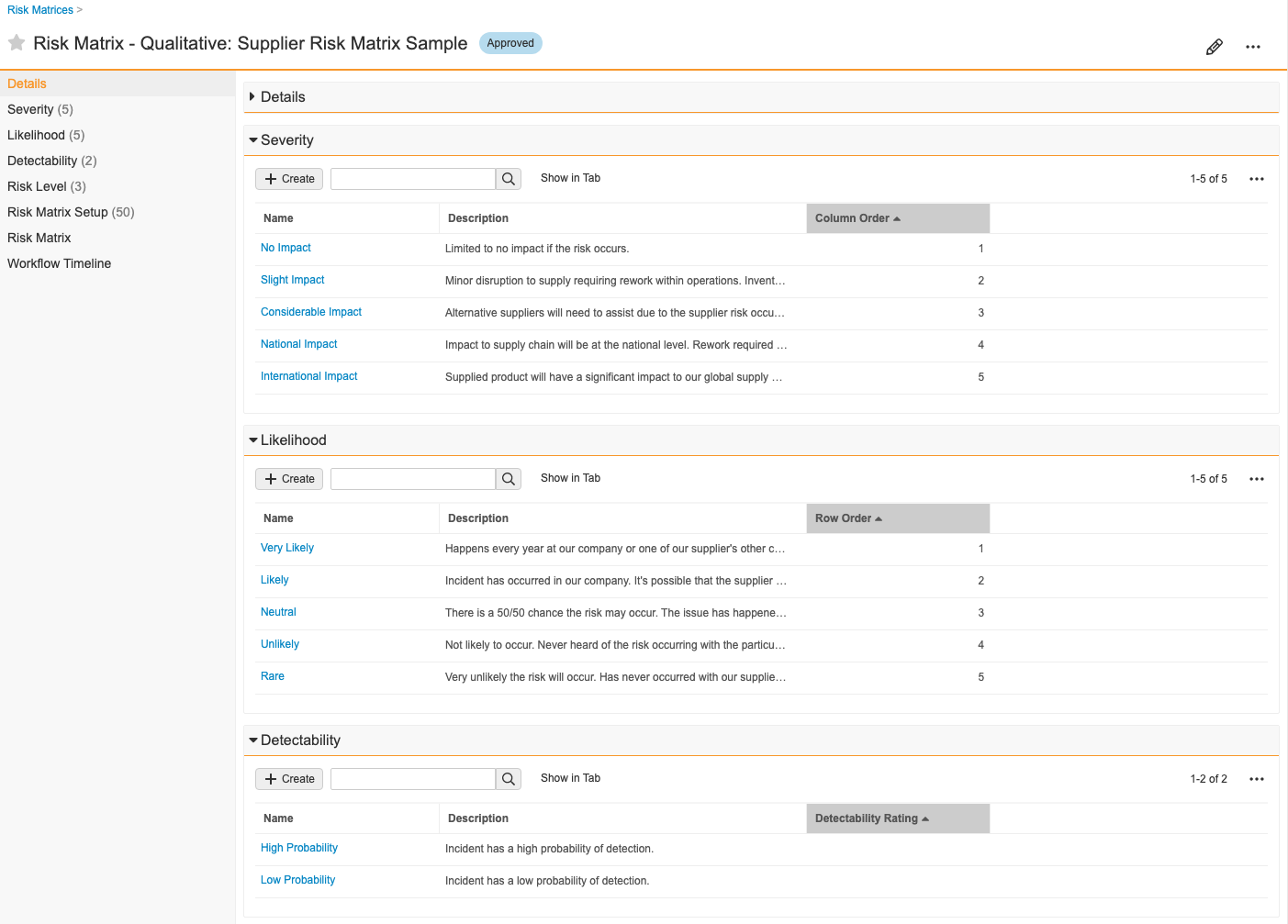
6. In the new _Risk Matrix_ record, create and define related _Severity_, _Likelihood_, and _Detectability_ (if in use) records.
7. Define the color palette for your _Risk Level_ records. These are the cells of your matrix chart.
Vault automatically creates _Risk Matrix Setup_ records and populates fields with data from related _Severity_, _Likelihood_, _Detectability_ (if in use), and _Risk Level_ records.
See [Configuring Risk Management](/en/lr/547410/#risk-matrix-visual) for information on displaying the _Risk Matrix Visualization_.
## Risk Registers {#risk-registers}
A _Risk Register_ is a repository of risk-related events or opportunities that can potentially occur. These events or opportunities may require action to reduce their risk levels. The intent is to assess risks proactively and attempt to prevent them before they occur. Typically, a cross-functional team identifies potential risks and opportunities. This assessment typically takes place before, rather than after, a quality issue occurs. For example, a customer complaint, a hazardous incident, or a product nonconformance.
### How to Create a Risk Register {#create-register}
To create a _Risk Register_:
1. Create a _Risk Register_ from the **Risk Management > Risk Register** tab or from **Business Admin > Objects > Risk Registers**.
2. Create _Risk Events_ within the register. Link a matrix to this event using the _Risk Matrix_ field. For example, you could link an event to the "Supplier Risk Matrix", when assessing a supplier-related risk.
3. Depending on your selection for _Risk Response_, you may be required to take mitigation actions.
### Example Risk Register Setup {#example-setup}
You can use the following example steps to help set up your _Risk Register_:
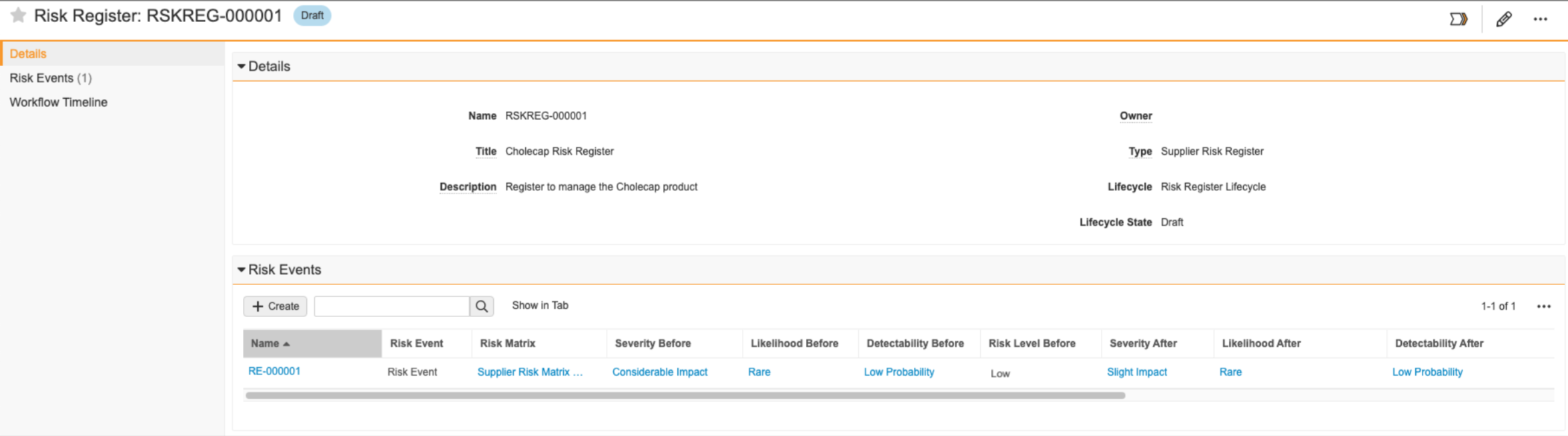
1. You create the "Cholecap Risk Register" record to manage risk related to introducing your new Cholecap product to the market. You want to assess the risk related to the distribution of your product, so you create a risk event and select your "Supplier Risk Matrix" as your definition of risk. Your matrix determines the _Risk Level Before_ as "Low".
### How to Create a Risk Matrix {#create-matrix}
To create a _Risk Matrix_:
1. Create a _Risk Matrix_ record from a custom tab or from **Business Admin > Objects > Risk Matrices**.
2. In the dialog, select a risk matrix type of qualitative or quantitative.
3. Enter a **Name** for the matrix.
4. Enter a **Risk Matrix Dimension** to specify whether the assessment uses 2D or 3D risk matrices.
* If you use both 2D and 3D risk matrices in your Vault, _Risk Matrix Dimension_ is required and cannot be changed after record creation. If you use only 2D or 3D matrices in your Vault, _Risk Matrix Dimension_ is optional and may not be available.
5. Click **Save** to create the new _Risk Matrix_.
6. In the new _Risk Matrix_ record, create and define related _Severity_, _Likelihood_, and _Detectability_ (if in use) records.
7. Define the color palette for your _Risk Level_ records. These are the cells of your matrix chart.
Vault automatically creates _Risk Matrix Setup_ records and populates fields with data from related _Severity_, _Likelihood_, _Detectability_ (if in use), and _Risk Level_ records.
See [Configuring Risk Management](/en/lr/547410/#risk-matrix-visual) for information on displaying the _Risk Matrix Visualization_.
## Risk Registers {#risk-registers}
A _Risk Register_ is a repository of risk-related events or opportunities that can potentially occur. These events or opportunities may require action to reduce their risk levels. The intent is to assess risks proactively and attempt to prevent them before they occur. Typically, a cross-functional team identifies potential risks and opportunities. This assessment typically takes place before, rather than after, a quality issue occurs. For example, a customer complaint, a hazardous incident, or a product nonconformance.
### How to Create a Risk Register {#create-register}
To create a _Risk Register_:
1. Create a _Risk Register_ from the **Risk Management > Risk Register** tab or from **Business Admin > Objects > Risk Registers**.
2. Create _Risk Events_ within the register. Link a matrix to this event using the _Risk Matrix_ field. For example, you could link an event to the "Supplier Risk Matrix", when assessing a supplier-related risk.
3. Depending on your selection for _Risk Response_, you may be required to take mitigation actions.
### Example Risk Register Setup {#example-setup}
You can use the following example steps to help set up your _Risk Register_:
1. You create the "Cholecap Risk Register" record to manage risk related to introducing your new Cholecap product to the market. You want to assess the risk related to the distribution of your product, so you create a risk event and select your "Supplier Risk Matrix" as your definition of risk. Your matrix determines the _Risk Level Before_ as "Low".
 2. Your organization's risk response strategy is to mitigate all risk, so mitigation actions are necessary. You create a _Mitigation Action_ record and use the _Owner_ field to assign the action to a specific user.
3. The assigned owner then completes the [_Mitigation Action_][8] task and describes the actions taken.
4. In the _Residual Risk_ lifecycle state of the _Risk Event_'s workflow, you then populate the _Severity After_ field with "Slight Impact" and the _Likelihood After_ field with "Rare" since the mitigation action helped reduce the severity of the risk as well as the likelihood the risk event will materialize. You also populate the _Detectability After_ field with "Low Probability". If the team agrees the risk has been reduced to an acceptable level, you can close the risk event. If not, additional risk treatment may be required where you can assign additional mitigation actions.
Your organization now has a [_Risk Event_][9] record of the risk assessment related to the identified risk event of this nature.
## Risk Events {#risk-events}
A _Risk Event_ is an object record that describes a potential risk which may have a detrimental effect on the business should it occur on each Quality and HSE Event. Every risk event goes through a standard risk assessment whereby the risk is first identified, analyzed, and evaluated based on the definition of risk using a particular risk matrix. Then the risk is treated with mitigation activities, and any residual risk is assessed.
### Critical Fields {#critical-fields}
_Risk Events_ have several fields that help you describe the risk addressed through the risk assessment process:
* **Severity Before, Likelihood Before, and Detectability Before**: These fields represent how severe, how likely, and how detectable the risk event is before you complete any mitigation actions. _Detectability Before_ is only available in Vaults with three-dimensional matrices enabled.
* **Severity After, Likelihood After, and Detectability After**: These fields represent how severe, how likely, and how detectable the risk event is after you complete mitigation actions. The effectiveness of the mitigating activities will help to assess residual (remaining) risk after the mitigation actions are fully executed. _Detectability Before_ is only available in Vaults with three-dimensional matrices enabled.
* **Risk Level Before and Risk Level After**: Vault populates these fields based on the definition of the _Risk Level_ cell from the selected risk matrix.
### Mitigation Actions {#mitigation-actions}
The _Mitigation Action_ object type helps you take steps to avoid, mitigate, or transfer identified risks. You can assign these mitigation actions to users in your Vault, provide due dates, and describe what the assignee must do to mitigate the risk.
You can create _Mitigation Actions_ from _Risk Event_ records.
After completing any mitigation actions, use the _Actions Taken_ field to give specific details on the actions you took. This field is crucial for determining _Severity After_, _Likelihood After_, and _Detectability After_ on the related _Risk Event_.
### Quality & HSE Events {#quality-hse-events}
_Quality Events_ and [_HSE Events_](/en/lr/546427/) capture quality issues and incidental hazards to help identify potential risks. You can associate _NCR_ and _HSE Events_ from _Risk Event_ records to provide visibility and identification for risk assessment.
## Risk Study {#risk-study}
A _Risk Study_ is an object record that captures risk methodologies such as HAZOP and P-FMEA . HAZOP is a risk study that identifies and analyzes potential hazards and operability issue nodes within the system, personnel, and equipment. P-FMEA is a risk study that identifies and analyzes potential process failure modes and their causes and effects on business processes. Using either of these types of risk studies allows you to detail and assess potential study risks. Each risk scenario you identify is assigned a score based on the _Risk Matrix_. Vault uses the score to calculate the RPN (Risk Priority Number), allowing you to easily decide to accept the risk or create a _Mitigation Action_ for the risk analysis.
### How to Copy a Risk Study {#copy-risk-study}
You can save time and effort starting a new _Risk Study_ by copying the details from a completed _Risk Study_ using the _Copy Risk Study_ action; your action name may vary. This action differs from the [_Copy Record_](/en/lr/32218/) action as it copies the hierarchy of a _Risk Study_ and its related records by cloning the _Risk Study_, _HAZOP Node_, _FMEA Process Step_, and _Risk Analysis_ records for _Risk Study_, _HAZOP_, and _P-FMEA_.
To copy a completed _Risk Study_, navigate to the appropriate _Risk Study_ record and select **Copy Risk Study** from the **All Actions** menu. When the copy is complete, you'll receive a notification that the _Risk Study_ has been created with a link to the new record.
2. Your organization's risk response strategy is to mitigate all risk, so mitigation actions are necessary. You create a _Mitigation Action_ record and use the _Owner_ field to assign the action to a specific user.
3. The assigned owner then completes the [_Mitigation Action_][8] task and describes the actions taken.
4. In the _Residual Risk_ lifecycle state of the _Risk Event_'s workflow, you then populate the _Severity After_ field with "Slight Impact" and the _Likelihood After_ field with "Rare" since the mitigation action helped reduce the severity of the risk as well as the likelihood the risk event will materialize. You also populate the _Detectability After_ field with "Low Probability". If the team agrees the risk has been reduced to an acceptable level, you can close the risk event. If not, additional risk treatment may be required where you can assign additional mitigation actions.
Your organization now has a [_Risk Event_][9] record of the risk assessment related to the identified risk event of this nature.
## Risk Events {#risk-events}
A _Risk Event_ is an object record that describes a potential risk which may have a detrimental effect on the business should it occur on each Quality and HSE Event. Every risk event goes through a standard risk assessment whereby the risk is first identified, analyzed, and evaluated based on the definition of risk using a particular risk matrix. Then the risk is treated with mitigation activities, and any residual risk is assessed.
### Critical Fields {#critical-fields}
_Risk Events_ have several fields that help you describe the risk addressed through the risk assessment process:
* **Severity Before, Likelihood Before, and Detectability Before**: These fields represent how severe, how likely, and how detectable the risk event is before you complete any mitigation actions. _Detectability Before_ is only available in Vaults with three-dimensional matrices enabled.
* **Severity After, Likelihood After, and Detectability After**: These fields represent how severe, how likely, and how detectable the risk event is after you complete mitigation actions. The effectiveness of the mitigating activities will help to assess residual (remaining) risk after the mitigation actions are fully executed. _Detectability Before_ is only available in Vaults with three-dimensional matrices enabled.
* **Risk Level Before and Risk Level After**: Vault populates these fields based on the definition of the _Risk Level_ cell from the selected risk matrix.
### Mitigation Actions {#mitigation-actions}
The _Mitigation Action_ object type helps you take steps to avoid, mitigate, or transfer identified risks. You can assign these mitigation actions to users in your Vault, provide due dates, and describe what the assignee must do to mitigate the risk.
You can create _Mitigation Actions_ from _Risk Event_ records.
After completing any mitigation actions, use the _Actions Taken_ field to give specific details on the actions you took. This field is crucial for determining _Severity After_, _Likelihood After_, and _Detectability After_ on the related _Risk Event_.
### Quality & HSE Events {#quality-hse-events}
_Quality Events_ and [_HSE Events_](/en/lr/546427/) capture quality issues and incidental hazards to help identify potential risks. You can associate _NCR_ and _HSE Events_ from _Risk Event_ records to provide visibility and identification for risk assessment.
## Risk Study {#risk-study}
A _Risk Study_ is an object record that captures risk methodologies such as HAZOP and P-FMEA . HAZOP is a risk study that identifies and analyzes potential hazards and operability issue nodes within the system, personnel, and equipment. P-FMEA is a risk study that identifies and analyzes potential process failure modes and their causes and effects on business processes. Using either of these types of risk studies allows you to detail and assess potential study risks. Each risk scenario you identify is assigned a score based on the _Risk Matrix_. Vault uses the score to calculate the RPN (Risk Priority Number), allowing you to easily decide to accept the risk or create a _Mitigation Action_ for the risk analysis.
### How to Copy a Risk Study {#copy-risk-study}
You can save time and effort starting a new _Risk Study_ by copying the details from a completed _Risk Study_ using the _Copy Risk Study_ action; your action name may vary. This action differs from the [_Copy Record_](/en/lr/32218/) action as it copies the hierarchy of a _Risk Study_ and its related records by cloning the _Risk Study_, _HAZOP Node_, _FMEA Process Step_, and _Risk Analysis_ records for _Risk Study_, _HAZOP_, and _P-FMEA_.
To copy a completed _Risk Study_, navigate to the appropriate _Risk Study_ record and select **Copy Risk Study** from the **All Actions** menu. When the copy is complete, you'll receive a notification that the _Risk Study_ has been created with a link to the new record.
Note: Vault does not copy a Risk Study record when more than 1,000 records are available to copy from the Risk Study record.