Note: As of 22R1, Control Charts are no longer available for Product records.
## Control Chart Details {#chart-details}
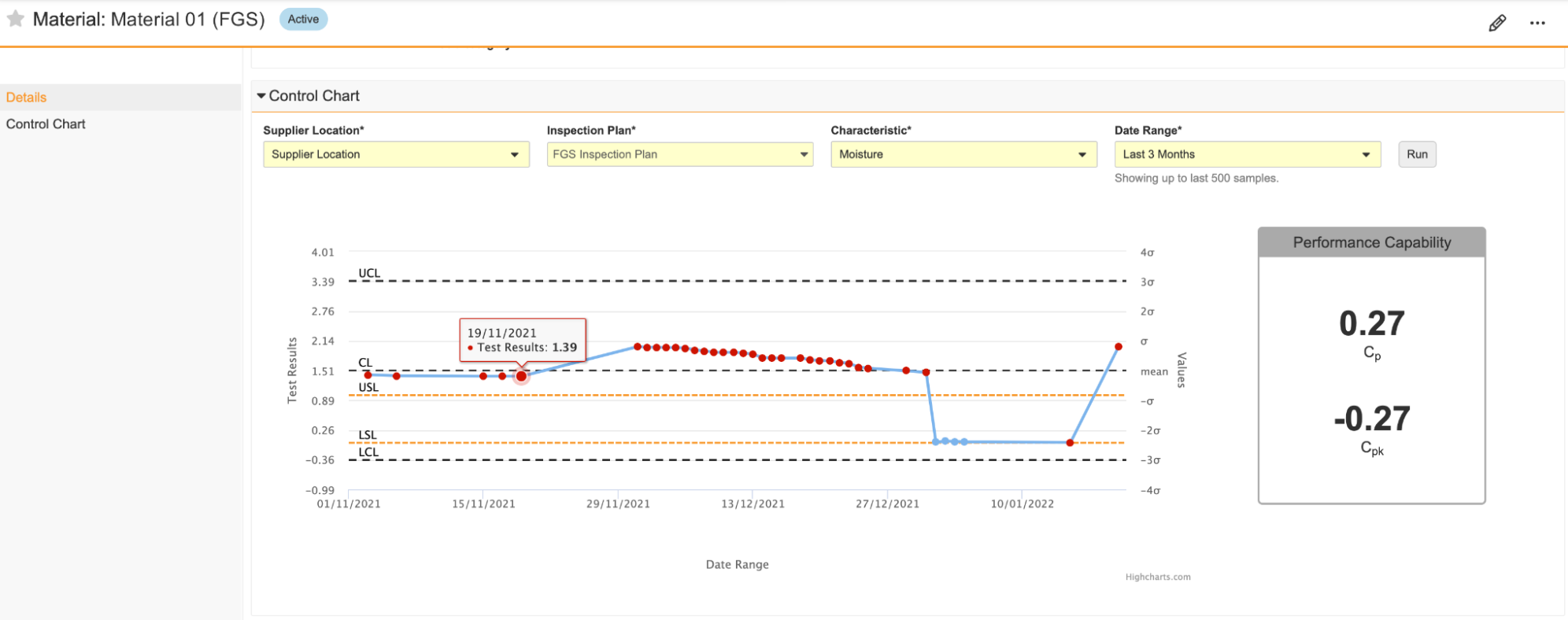
A control chart consists of the following details, plots, and lines that represent _Material_ data:
* USL and LSL orange dotted lines:
* Upper Specification Limit and Lower Specification Limit.
* The threshold limits are considered to be the highest and lowest specification that is still acceptable to customers.
* This is based on the selected _Inspection Plan_ and _Characteristic_ filters.
* UCL and LCL grey dashed lines:
* Upper Control Limit and Lower Control Limit.
* The threshold limits are considered to be the highest and lowest level of quality acceptable for a material.
* These are based on the plotted data points and are three (3) standard deviations from Central Line.
* CL black dashed line:
* Central Line.
* The mean value of the plotted data points.
* Blue dots:
* Represent values from _Test Result (Variable Data)_ type _Inspection Sample Test Result_ records for the applicable _Material_ that align with the selected [control chart filters][1].
* Clicking on a blue dot in the control chart opens the corresponding _Inspection Sample Test Result_ record in a new browser tab.
* Performance Capability chart:
* Cpk (performance) and Cp (capability) ratios help to illustrate a process' ability to meet specifications.
* Cpk is calculated by the minimum of Cpl (Cpk LSL) and Cpu's (Cpk USL) average. The minimum average is calculated by subtracting the mean and dividing it by three (3) standard deviations.
* Cp is calculated by subtracting LSL from USL and dividing it by six (6) standard deviations.
### Control Chart Filters {#chart-filters}
The _Control Chart_ section contains four (4) required filters that narrow the scope of your control chart:
* The _Supplier Location_ or _Facility_ filter:
* Displays as _Supplier Location_ if the _Procurement Type_ field value on the _Material_ record is blank or _Purchased_, and displays as _Facility_ if the _Procurement Type_ field value is _Manufactured_.
* Populates any _Inspection Sample Test Result_ records that meet the following criteria as data points on the chart:
* The _Material_ on the associated _Inspection_ record matches the _Material_ for which you are generating the control chart.
* If the _Supplier Location_ filter displays, the selected _Supplier Location_ value matches the _Supplier Manufacturing Site_ field value on the _Inspection_ record associated with the _Inspection Sample Test Result_. If the _Facility_ filter displays, the selected _Facility_ value matches the _Facility_ field value on the _Inspection_ record associated with the _Inspection Sample Test Result_.
* The _Inspection Plan_ filter:
* Displays _Inspection Plan_ values associated with the _Material_ record.
* Displays USL and LSL from the _Inspection Plan_ to specify limit boundaries on the chart.
* The _Characteristic_ filter:
* Depends on the _Inspection Plan_ filter.
* Displays _Characteristic_ values associated with the _Inspection Plan_ object record.
* Populates any _Inspection Sample Test Result_ record associated with the selected _Characteristic_ as a data point on the chart.
* The _Date Range_ or _Sample Count_ filter:
* Displays _Date Range_ or _Sample Count_ values, depending on your Admin's configuration.
## How to Generate a Control Chart {#generate-chart}
To generate a control chart for a _Material_ record:
1. Navigate to the _Control Chart_ section on the appropriate _Material_.
2. Choose a **Supplier Location** or **Facility** from the [filter][1].
3. Choose an **Inspection Plan** from the filter.
4. Choose a **Characteristic** from the filter.
5. Choose a **Date Range** or **Sample Count** from the filter.
6. Click **Run**. This generates a control chart to match your filters. Repeat the process to generate different control charts with different filters.
You must regenerate the control chart each time you reopen the _Material_ record.
[1]: #chart-filters