# QualityOne Training Management Automation

<a href="/en/gr/55180/">QualityOne Vaults</a> use a system-managed job called _Update Training Assignments_ to automate the creation and distribution of training assignments and tasks. Vault creates training assignments when learner role, curriculum, and training requirement object records are all in eligible lifecycle states. Conversely, Vault does not create training assignments for object records in retired or inactive lifecycle states.

You can determine when the job runs to best suit your requirements. Otherwise, Vault defaults the job to run once a day at midnight UTC.

<div class="note-border alert-info">
  <div class="alert alert-info" role="alert">
    <div><i class="far fa-info-circle"></i></div>
    <div class="alert-text">
      <p><strong>Note</strong>: The <em>Update Training Assignments</em> job is necessary to the functionality of Training Management, and therefore cannot be removed or edited beyond setting when the job occurs.</p>
    </div>
  </div>
</div>


## About Automation Logic {#about}

All related objects records must be in their respective <a href="/en/gr/55154/#eligible-lifecycle-states">eligible lifecycle states</a> for the _Update Training_ _Assignments_ job to create or update training assignment records.

When the _Update Training Assignments_ job runs, Vault checks the configuration of all _Person_, _Curriculum_, _Training Requirements_, and _Learner Role_ object records and creates training assignments for object records that are in eligible lifecycle states or have had changes made to their configuration. Related records for all four (4) object records must be in their eligible state, or Vault doesn't create a training assignment.

For example, your Vault has a _Quality Inspector_ learner role that is assigned the _General GxP Documents_ curriculum which itself has the _Employee Conduct Policies_ and _Document Management_ training requirements. If _New Employee's_ lifecycle state is _Eligible_ and _General GxP Documents_ is _Available_, but _Employee Conduct Policies_ is _Retired_, Vault only creates a training assignment for the _Document Management_ requirement.

### Person Training Eligibility {#eligibility}

By default, Vault uses the _Status_ field on the _Person_ object to determine whether a _Person_ should receive _Training Assignment_ tasks.

Vault can use an alternate field, _Training Eligibility_, to determine whether a _Person_ should receive Training Assignment tasks. Functionally, a _Training Eligibility_ value of "Eligible" is the same as a _Status_ of "Active", and a _Training Eligibility_ value of "Not Eligible" is the same as a Status of "Inactive". _Person, Lifecycle_, and other Vault functionalities can also be used to set the _Training Eligibility_ field.

When a _Learner Role_ is added to a _Person_ record, Vault automatically checks whether the _Person_ object record appropriately references an active _User_ or if another _Person_ record references the same _User_. Vault displays an error when attempting to save such a _Person_ object record. While the _Training Eligibility_ feature is enabled, Vault does not perform this check if the _Training Eligibility_ value is either _Not Eligible_ or blank.

<div class="note-border alert-info">
  <div class="alert alert-info" role="alert">
    <div><i class="far fa-info-circle"></i></div>
    <div class="alert-text">
      <p><strong>Note</strong>: Contact your Veeva Representative to enable this feature in your Vault.</p>
    </div>
  </div>
</div>


### Retiring Learner Roles, Curricula, or Training Requirements {#retire}

In the case that a particular learner role, curriculum, or training requirement is no longer needed, you can change its lifecycle state to the respective retired or inactive state. When records leave their eligible lifecycle state and enter the retired or inactive state, Vault stops creating training assignments and cancels any open training assignments associated with those object records the next time the job is run. This includes workflows and user tasks.

<div class="note-border alert-info">
  <div class="alert alert-info" role="alert">
    <div><i class="far fa-info-circle"></i></div>
    <div class="alert-text">
      <p><strong>Note</strong>: You cannot move a learner role, curriculum, or training requirement object record out of a retired or inactive state.</p>
    </div>
  </div>
</div>


### Versioning Documents in Training Management {#versioning_docs}

Always create a draft or upload new versions of your documents to ensure that Vault continues to create training assignments.

Vault cancels previously open assignments when issuing a new _Training Assignment_ issued for the same document. If you do not want to cancel open assignments for documents in this way, select the **Keep Open Training Assignments** checkbox in the **Issue Training Assignment** document lifecycle entry action. _Learners_ may then have multiple _Training Assignments_ with different document versions for the same document.

To prevent a _Learner_ from completing training against a superseded document, configure the **Cancel Open Training Assignments** entry action on the _Superseded_ document lifecycle state. When the document enters the _Superceded_ state, Vault cancels open _Training Assignments_ that reference the superseded document.

You can configure a document lifecycle to automatically find _Training Requirement_ records that reference an obsolete document and change the lifecycle state to _Retired_. To do so, configure the **Change Related Training Requirement to Retired** document lifecycle entry action to the obsolete document state.

### Substitute Training {#substitute}

If you have defined <a href="/en/gr/71120/">substitution rules</a> for _Training Requirements_ in your Vault, the _Update Training Assignments_ job will create the primary _Training Assignment_ in the _Pending Substitute Completion_ (`pending_substitute_completion_state__v`) lifecycle state and create a join record in the _Related Training Assignment_ (`related_training_assignment__v`) object. The job creates a substitute _Training Assignment_ in the _Assigned_ lifecycle state.

## Job Status {#job}

You can view the status of the job and receive information on why/when a job did not complete. In the example above, Vault records the failure of the training assignment creation due to the training requirement _Employee Conduct Policies_ not being in its eligible lifecycle state.

View the status of this and other jobs Vault creates in your Vault from **Admin > Operations >** <a href="/en/gr/24762/">**Job Status**</a>.

## QualityOne Training Job Logs {#job_logs}

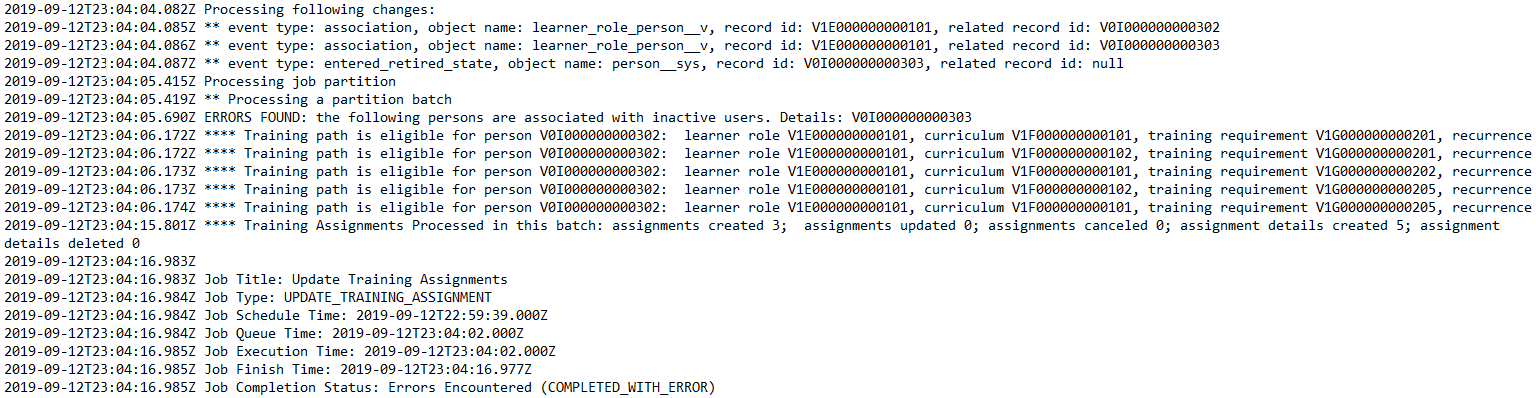
After the _Update Training Assignments_ job runs, you can download the job log by clicking the action button on the job instance. The _Update Training Assignments_ job log lists a count of changes that were flagged as processing, processed, and successfully completed, as well as any <a href="/en/gr/71120/">substitution logic</a> that was applied. The log lists any errors that occurred during the job run.

This log also lists typical information such as **Job Schedule Time** and **Job Execution Time**.

### Example Update Training Assignments Job Log {#example-job-log}

This sample job log details the results of an _Update Training Assignments_ job that encountered an error:

<a href="https://platform.veevavault.help/assets/images/CPC-TrainingMgmt-JobLog.png" data-lightbox="CPC-TrainingMgmt-JobLog.png" data-title="" data-alt="Training Job Log">
  <img class="docimage" src="https://platform.veevavault.help/assets/images/CPC-TrainingMgmt-JobLog.png" alt="Training Job Log" style=""  />
</a>

In this case, you can see that the job processed the following changes and evaluated their impact:

* Two (2) _Learner Role_ object records were associated with _Person_ object records
* One (1) _Person_ object record entered the _Retired_ state

The job then processed _Training Assignments_:

* One (1) error was encountered: A _Person_ record was associated with an inactive _User_ record
* Five (5) training paths were evaluated, resulting in three (3) new _Training Assignments_ and five (5) new _Training Assignment_ object record details